
Smart TV Privacy Settings You Must Adjust in 2026
Smart TV owners in 2026 are getting more than just crystal-clear picture quality and voice-controlled streaming. Behind those dazzling OLED panels, a quiet data collection machine runs around the clock. Modern televisions can log viewing habits, analyze ambient noise, and even track which buttons get pressed on the remote. The payoff is a hyper-personalized experience—but at a cost that many viewers haven't fully confronted. The low-hanging fruit for reclaiming privacy lies in five key settings that are often buried in menus. Adjusting them slashes unnecessary tracking without gutting the core features that make a smart TV enjoyable.
Silent Watchdog: Automatic Content Recognition
Automatic Content Recognition (ACR) remains the big kahuna of smart TV privacy invasions. This technology scans whatever appears on screen—terrestrial broadcasts, streaming apps, even gameplay fed through an HDMI port—and matches it against a massive database of video fingerprints. The resulting data flows straight back to the manufacturer and its advertising partners, painting a minute-by-minute picture of household media consumption.
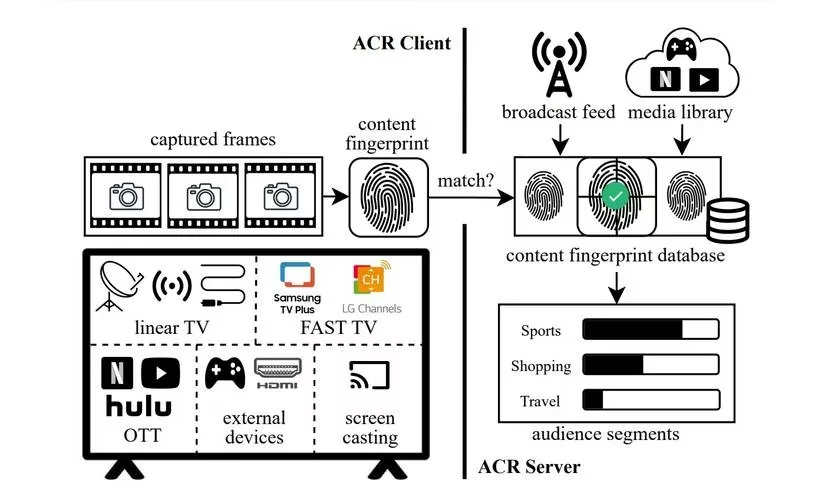
In plain English, ACR acts as a relentless Nielsen family on steroids, except it never sleeps and reports to advertisers instead of rating agencies. It's the primary reason some cybersecurity experts recommend completely disconnecting a smart TV from the internet. But turning off ACR is usually a straightforward affair once you know where to dig. The tricky part is that every brand uses its own naming convention. Samsung hides the feature under "Viewing Information Services," while LG dresses it up as "Live Plus." Sony and Vizio bury it in "Privacy" or "Advertising Settings." A quick online search for "disable ACR [manufacturer name]" will surface the exact menu path for any model released in the last few years. After flipping the switch, the TV may still show ads, but they won't be based on a forensic analysis of every movie one binge-watches at 2 a.m.
The Always-Listening Assistant
Voice assistants baked into smart TVs and their remotes have become smarter and more pervasive in 2026, but the privacy trade-off remains steep. Even when a viewer isn't barking commands at the screen, the microphone stays in a low-power listening mode, waiting for a wake word. Accidental triggers are more common than manufacturers admit—a snippet of a TV character saying something vaguely similar to "Hey, Google" can summon an eavesdropping session without anyone noticing.
For households that rarely use voice search or voice control, disabling the assistant is a no-brainer. The setting often lives under a "Voice" or "Assistant" menu, with clear toggles to turn off microphone access entirely. Physical kill switches have made a welcome comeback on premium models, allowing users to slide a shutter over the mic or even cut power to the chip. When a physical switch isn't available, a piece of opaque tape over the microphone hole—while decidedly old-school—works like a charm. On the remote side, unpairing Bluetooth and sticking to infrared commands eliminates another vector for voice data collection.
Ad Personalization and Data Sharing
Smart TVs don't just collect data for their own use; they serve it up to third-party ad networks on a silver platter. Ad personalization settings control whether the TV uses viewing history, search queries, and interaction patterns to target commercials. Turning this off doesn't magically make ads disappear, but it does strip away the creepy factor—no more pitch-perfect ads for a product mentioned in a private conversation ten minutes earlier.
Each manufacturer structures these opt-out menus differently. Samsung users need to visit "Privacy Choices" and deselect every data-sharing option that doesn't serve the TV's basic functionality. LG owners must review the "User Agreement" and uncheck boxes tied to personalized advertising and third-party data sharing. Vizio, notorious for pioneering aggressive tracking, now offers a clear "Viewing Data" toggle after years of regulatory pressure. Roku TVs centralize ad controls under "Settings > Privacy > Advertising," where a simple "Limit ad tracking" option does most of the heavy lifting. A recurring theme: run a manual check after every firmware update, because manufacturers have a habit of resetting these preferences with a silent shrug.
Full-Spectrum Privacy Audit
A smart TV is closer to a computer than to the CRT behemoths of the past, which means it hosts an array of sensors, apps, and connected services that can leak data in unexpected ways. Running a privacy audit once every six months catches permissions that got broadened by an update or an app install.
Microphone & Camera Access – Some 2026 models still ship with pop-up cameras for video calls or fitness tracking. If nobody uses Zoom on the living room screen, disabling camera access in the system settings and closing the physical lens cover should be step one. The same goes for microphones: check both the main settings menu and each individual app's permissions list.
Location Services – Most TVs ask for location access to deliver local weather, targeted news, or regional ad insertions. Unless the TV uses an antenna and needs location for channel mapping, turning this off under "Location" or "Privacy" removes a unnecessary tracking dimension.
App Permissions – Streaming apps rarely need microphone or camera access. Go through the app list and revoke anything that seems overly greedy. Better yet, delete apps that haven't been launched in months—digital clutter is still clutter, and it can quietly hoover up data in the background.
Account Syncing & Cross-Device Tracking – Many ecosystems link TV activity with a phone, tablet, or smart speaker to sync watchlists and recommendations. The convenience is real, but so is the data trail. In 2026, several brands offer granular controls to limit cross-device tracking without breaking the entire connected-home experience. Finding these under "Link Devices" or "Ecosystem Sync" and opting for minimal sharing keeps habits confined to one screen.
Firmware Updates: A Double-Edged Sword
Security patches are the unsung heroes of smart TV maintenance—they plug holes that attackers could exploit to gain network access or hijack the camera. Yet the firmware update cycle has earned a reputation as a Trojan horse for privacy resets. Manufacturers occasionally slip in new data-collection features or quietly flip ACR and ad-tracking toggles back to "on."
On the flip side, skipping updates leaves known vulnerabilities open for months. The smart play is to enable automatic updates for critical security patches but schedule a manual privacy check immediately after every major version bump. Most TVs now include a "What's New" section that lists changes; reading it only takes a minute and can reveal whether the update introduces new tracking clauses. If patch notes feel deliberately vague, a quick visit to the manufacturer's support forum usually surfaces user reports about any privacy regressions.
Balancing security and privacy gets simpler with a routine: update, verify, lock down. After a few cycles, the process becomes muscle memory. In the end, a smart TV should serve its owner—not the other way around.