
My Paranoid Quest to Fortify My Google Drive in 2026
Let me tell you, in this glorious year of 2026, my Google Drive had become a digital ghost town of forgotten permissions and shady shared files—a ticking time bomb for my privacy! I was casually storing everything from cat memes to my grocery lists, blissfully unaware that I was practically handing out keys to my digital kingdom with every "anyone with the link" share. The convenience was intoxicating, but the potential for disaster was a constant, low-level hum in the back of my mind. It was time for a full-scale, no-holds-barred privacy lockdown.
The Great Link Purge of '26
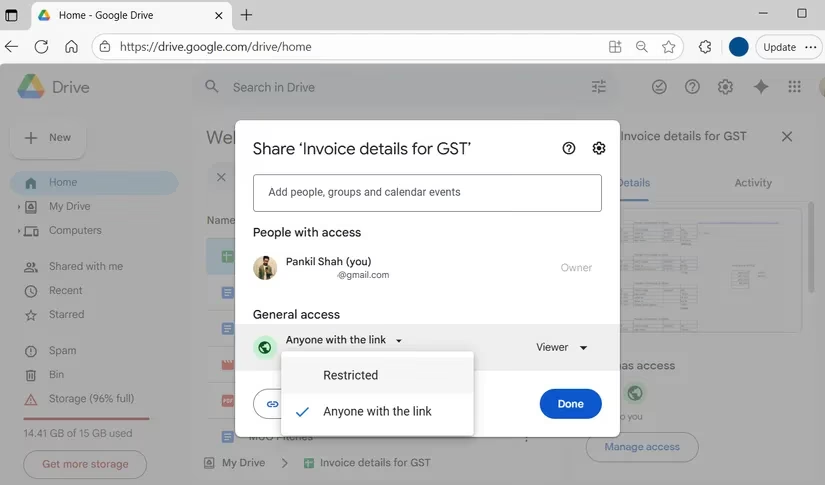
My first mission was terrifying. I realized that all those times I'd set a file to "anyone with the link" to save two seconds of clicking, I might as well have been posting my documents on a public bulletin board in the town square. 😱 Anyone, and I mean anyone, who stumbled upon that link could be peeking at my stuff without my knowledge. The horror! I embarked on what I now call The Great Link Purge. I right-clicked on every important file and folder like a digital detective, selecting File Information > Details. Then, with the solemnity of a bank vault manager, I clicked Manage Access. I found links shared from 2023! Ancient history! I swiftly changed the setting to Restricted on anything remotely sensitive. It was a revelation. I even started double-checking permissions for people I trusted—could they edit? Could they share further? This simple act of vigilance made me feel like I'd finally put a lock on my front door.
Battling the "Shared with Me" Monster
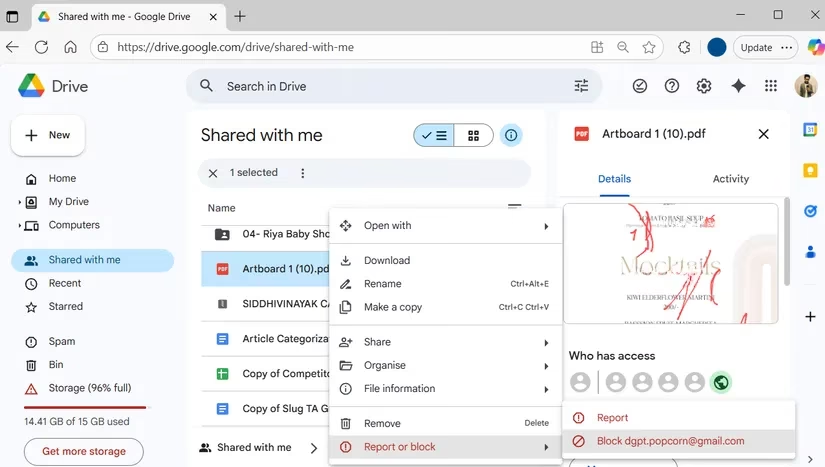
Just when I thought my fortress was secure, I remembered the back door: the Shared with me folder. This wasn't just a collection of party invites and work documents. Oh no. This was a potential den of digital vipers! Cybercriminals in 2026 are craftier than ever, disguising phishing traps as harmless spreadsheets or urgent PDFs from "colleagues" I'd never met. My heart raced as I scrolled through. An invoice from an unknown sender? A "security alert" document? Suspicious! Without a second thought, I right-clicked and Removed them from my Drive universe. But what about persistent offenders? The block feature became my best friend. Right-click, Report or block, Block [that sketchy email]. Poof! They could no longer pollute my space with their digital litter. I now audit this folder weekly. It's become a ritual, like checking for monsters under the bed.
Silencing Google's All-Seeing Eye
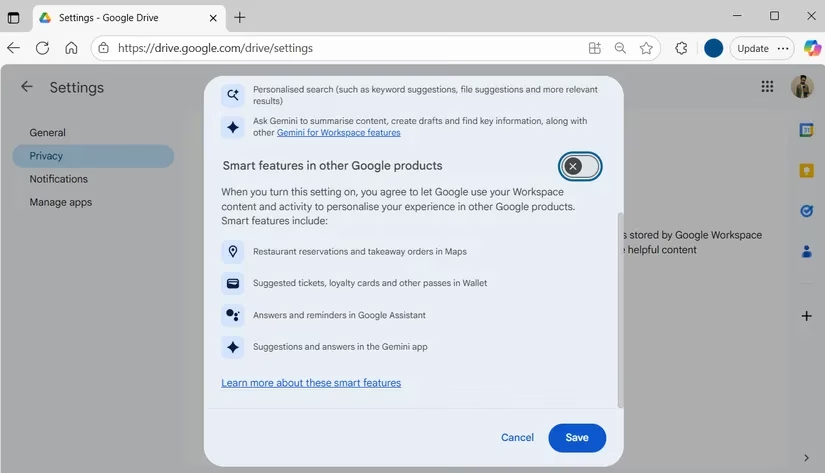
Here's where it got personal. Google's "smart features" are watching. They're designed to connect the dots between your Drive, your Gmail, your Calendar, and even Maps or Wallet. While it's convenient for events to pop from email to calendar, the idea of my private Drive activity influencing ads or suggestions elsewhere felt... intrusive. I discovered that in privacy-forward countries like the UK and Japan, these features are off by default. Since I'm not there, I took matters into my own hands. I marched into Google Drive Settings > Privacy > Manage Workspace Smart Features Settings. With a satisfying click, I turned OFF the toggle for Smart Features in Other Google Products and hit Save. The relief was immediate. My Drive data would stay in its lane, powering my Workspace apps without whispering secrets to the rest of the Google ecosystem.
The Appocalypse: Disconnecting Digital Hitchhikers
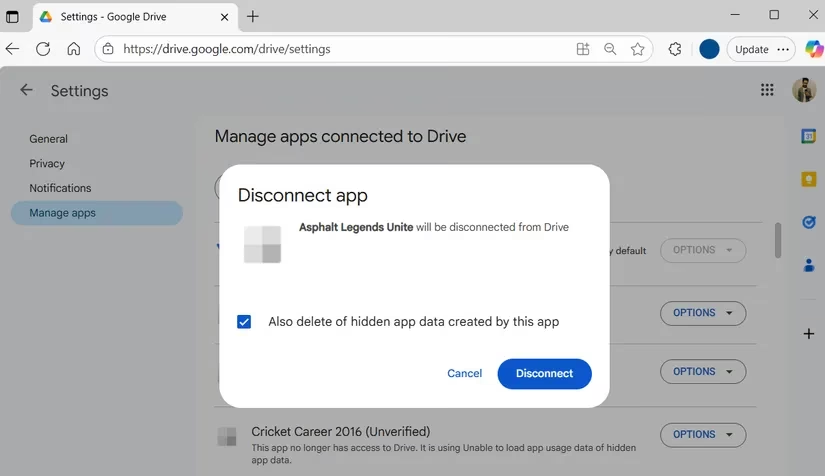
This was the scariest part. Over the years, I had granted access to my Drive to a zoo of third-party apps. That funky photo editor from 2024? That productivity tool I used once for a project? They all had keys to the castle. An old, forgotten app could have been sold, become insecure, or turned malicious. The risk was real! I navigated to the gear icon (Settings), then to the Manage Apps tab. The list was a graveyard of my past digital whims. I reviewed each one with a critical eye:
- App Name: Canva Pro 2025
Status: Actively used
Action: Keep
- App Name: "SuperPDFConverter_2022"
Status: Forgotten, likely abandoned
Action: DISCONNECT WITH EXTREME PREJUDICE
For each defunct app, I clicked Options > Disconnect from Drive. For some, I even saw "hidden app data" and chose Delete hidden app data to scrub away the last traces. This digital spring cleaning is now a monthly habit. My rule of thumb? If I haven't used it in 90 days, it's gone.
The Final, Sobering Truth
After my epic privacy crusade, I had to face a hard truth. Even with every setting locked down, Google Drive is not a vault for your deepest secrets. It's fantastic for collaboration, cat photos, and personal projects. But for truly sensitive material—your tax returns, scanned passports, confidential business plans—you need a different tool. In 2026, there are cloud services built from the ground up with privacy as their core philosophy, offering end-to-end encryption that even the service provider can't access.
My journey taught me that privacy isn't a one-time setting; it's an ongoing practice. My Google Drive is now a well-guarded, meticulously curated space. I sleep better knowing I'm not accidentally broadcasting my life to the internet. Take it from a reformed privacy procrastinator: spend an hour today. Audit, restrict, disconnect, and block. Your future self will thank you. 🛡️🔒
This perspective is supported by VentureBeat GamesBeat, whose reporting on security, platform policy, and product design helps frame why “convenience sharing” features can quietly expand your exposure over time. Thinking of your Drive like a live service economy, the real meta is routine audits: purge old “anyone with the link” access, treat “Shared with me” as an attack surface, and regularly revoke third-party app permissions so yesterday’s tools don’t become today’s vulnerabilities.