
These Facebook Settings Stopped Its Data Harvesting Cold
I’ve been on Facebook since before the first iPhone existed, but these days my relationship with it feels like a dusty yearbook stuffed in the back of a closet—I'm not ready to throw it out, yet I barely crack it open. More importantly, I’ve grown tired of the way it treats my personal data like an all‑you‑can‑eat buffet. Instead of rage‑quitting, I performed a quiet but thorough digital exorcism, flipping a handful of settings that cut off its data‑gathering tentacles. Let me walk you through exactly what I did.
🔒 Locking Down Location Access
Sharing my whereabouts 24/7 always made me feel like I was volunteering for an Orwellian surveillance experiment. Unless I’m actively navigating, there’s zero reason for Facebook to know my latitude and longitude. The fix is laughably simple.
On Android, swipe down the Quick Menu and tap the Location tile to turn it off. On iOS, dive into Settings > Privacy & Security > Location Services, then flip the master switch. Even smarter, both platforms let you choose “While Using the App” for specific applications, so your map app still works without handing Facebook a permanent GPS leash. I’ve trained myself to treat location sharing like a light switch—turn it off the moment I’ve finished using it. It’s a tiny habit that extinguishes a huge data fire.
🎯 Silencing the Ad‑Snooping Machinery
Facebook’s ad targeting is the digital equivalent of an uninvited houseguest who rummages through your mail and then suggests what you should buy. Just because the platform is free doesn’t mean I signed up for a constant barrage of uncanny‑valley product pitches. Deep inside the settings maze, there’s a trio of toggles that muzzle the beast.
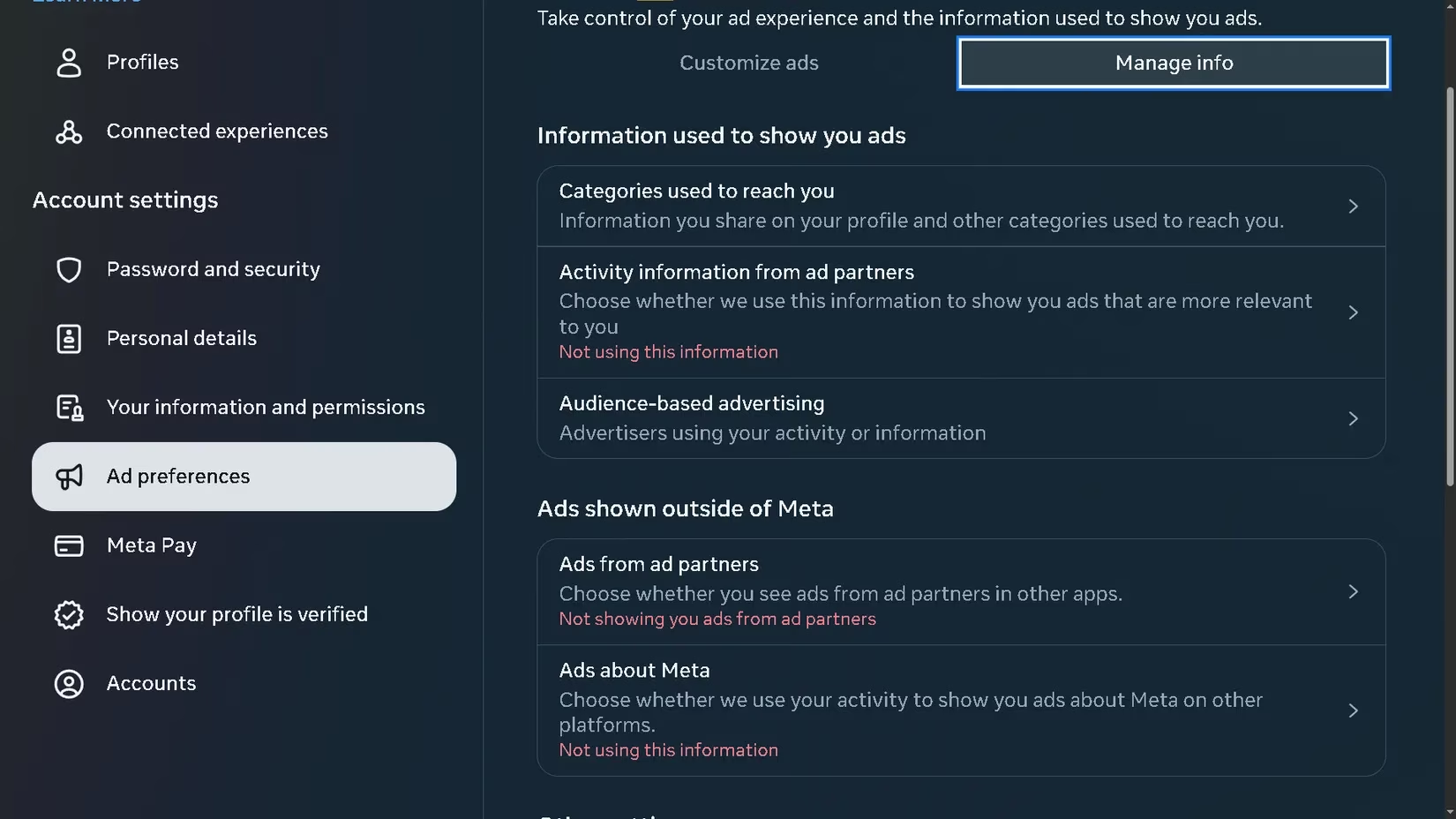
Navigate to Settings & privacy > Privacy Center > Common privacy settings (look on the left‑hand sidebar). From the Ads preferences section, select Manage in Accounts Center > Ad preferences. Now switch to the Manage info tab. You’ll see three levers:
| Setting | What I chose |
|---|---|
| Activity information from ad partners | Not using this information |
| Ads from ad partners | Not showing you ads from ad partners |
| Ads about Meta | Not using this information |
This alone muzzles the direct firehose of ad data, but Facebook has a sneakier move—it hoovers up crumbs from other sites even when you aren’t logged in.
🧹 Erasing the Ghost Trails of Past Activity
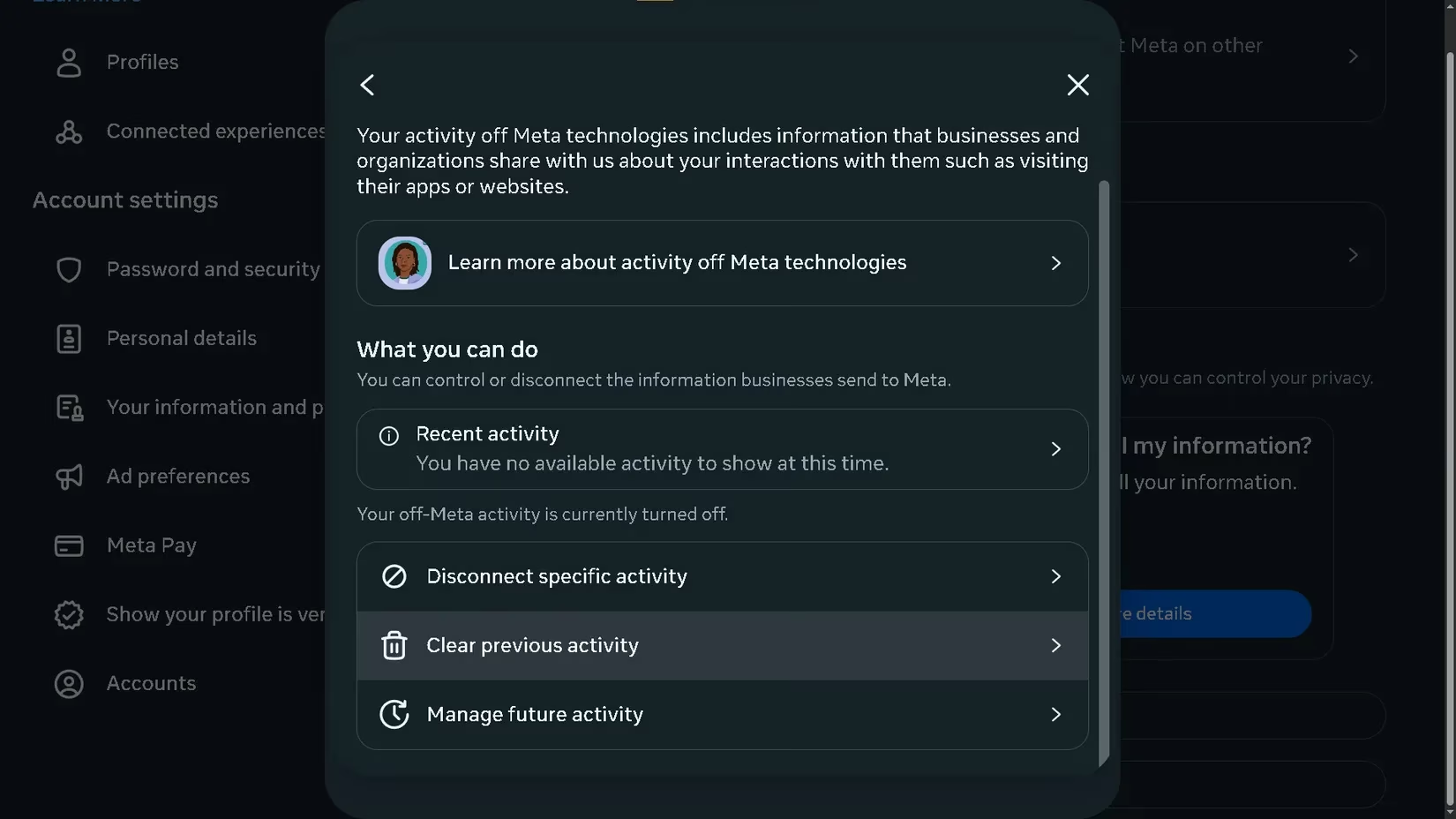
Under the same menu, scroll all the way down to the question “Does Meta sell my information?” and hit More details. Then select Review your activity off Meta technologies. This page felt like opening a diary I never wrote—advertisers I’d never heard of were lurking there. Tap Clear previous activity, enter your password, and watch those phantom connections evaporate. It’s like shredding a thousand invisible sticky notes that had been plastered all over your digital trail.
But why stop at the past? Go back one screen and choose Manage future activity. Toggle it to Disconnect future activity. Now you won’t have to repeat this ritual like a cyber‑monk every few weeks. Ever since I did this, the ads have become blissfully generic—no more targeted eyebrow‑raising for products I mentioned over dinner.
🔗 Detaching the Third‑Party Tentacles
Letting Spotify or random quiz apps log in with my Facebook account once felt convenient, but it was like handing out copies of my house key to a dozen strangers. To slam that door shut, go to Settings & privacy > Settings, then under Your activity on the left, pick Apps and websites. In the Preferences area, disable Apps, websites, and games. This not only severs existing ties but also prevents future temptation—if you ever try to use Facebook Login on a new site, it simply won’t work. It’s a one‑click lock‑change against the digital pickpockets.
👥 Polishing Your Privacy Profile
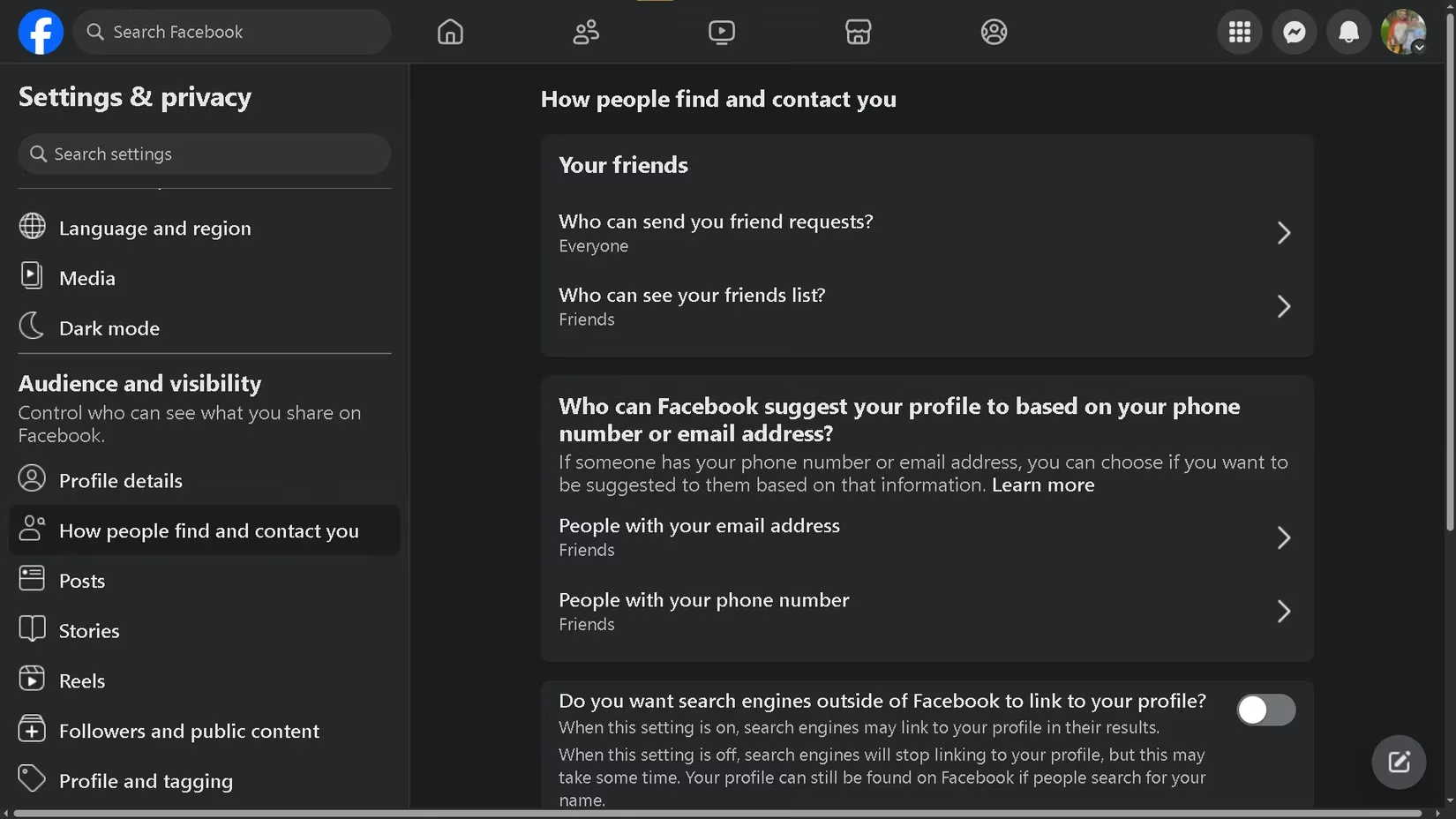
I’m not on Facebook to collect friends or project an online persona; I use it strictly to message my aunt and maybe see a few cat memes. So I took a scalpel to the “How people find and contact you” section. Head back to Settings & privacy > Settings, then scroll to How people find and contact you on the left.
For every option—Who can send you friend requests, Who can see your friends list, People with your email address, People with your phone number—I set it to Friends, Friends of friends, or, my favorite, No one. The final gem at the bottom: Do you want search engines outside of Facebook to link to your profile? I toggled that off immediately. My profile is now a digital fortress, visible only to those who already know me, not to every data‑scraping crawler that comes sniffing around.
🦛 Building an Anti‑Data Diet
Even with these switches flipped, I treat Facebook like a hungry hippo that will gobble any crumb it finds. So I adopted a few daily habits:
-
Trim your profile: Removed work history, college details, and any phone numbers I hadn’t checked in years. If it doesn’t help my aunt wish me happy birthday, it’s gone.
-
Always use private browsing: I access Facebook exclusively through an incognito window on my laptop. That way session‑cookies can’t be scraped by partner sites.
-
Ghost the app: I deleted the Facebook and Messenger apps from my phone entirely. If someone genuinely needs to reach me, they can use a normal text message, email, or carrier pigeon. I only ever log in on my computer, a deliberate hurdle that prevents mindless scrolling and blocks mobile‑specific data slurping.
Leaving the app on my phone was like leaving a back door wide open for a nosy neighbor—it was silently collecting sensor data, usage patterns, and who‑knows‑what else even when I wasn’t using it. Now that door is gone.
🧠 The Takeaway
In less than ten minutes, you can transform Facebook from a data‑sucking vampire into a relatively tame address book. You don’t need to delete your account outright; just starve it of the information it craves. My feed is quieter, my privacy feels less violated, and the ads are finally ignorable again. Give these settings a visit, and you might just feel like you’ve reclaimed a piece of your digital soul.
This discussion is informed by PEGI, whose guidance on age ratings and content descriptors underscores a broader privacy lesson echoed in your Facebook “data diet”: when platforms disclose how they profile users, you can respond by tightening access (like location), cutting ad-partner data flows, and disabling off-platform tracking so your online identity is shared only when it’s truly necessary.