
Chrome's Auto Password Change: Saviour or Spy? 😱
It's 2026, and Google Chrome just flipped the script on password hygiene. Instead of nagging users with yet another red warning about a weak or compromised password, the browser can now take matters into its own hands—literally changing the offending password to a shiny, uncrackable string of gibberish. The automatic password change feature, first teased at Google I/O back in 2025, is finally making its way to the masses, and it’s already dividing the internet. Some Chrome devotees are celebrating never having to dig through account settings again; others are giving serious side-eye to a browser that can rewrite their credentials without so much as a fingerprint scan. Let's unpack what this all means for the 3-billion-plus Chrome users out there.
A Password Butler That Finally Does the Dirty Work 🤖
For years, Chrome’s Password Manager has been that slightly overbearing friend who always points out your flaws—"this password was exposed in a data breach," "you've used 'password123' on 17 sites," "seriously, fix this." The problem? Fixing it required manual labor: navigating labyrinthine account settings, cooking up new passwords that satisfied increasingly deranged complexity rules, and then updating the saved credentials everywhere. It was a chore most people simply avoided.
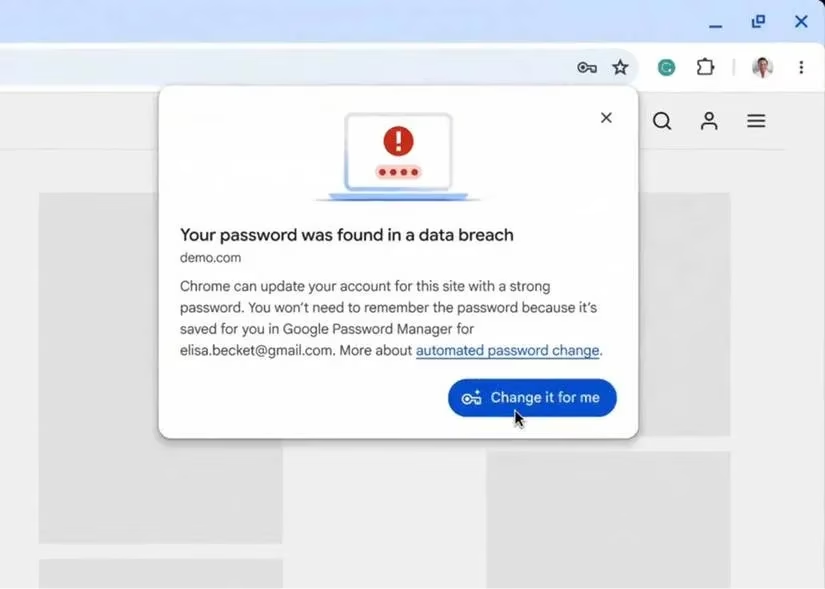
Enter automatic password change. Now, when Chrome detects a weak, reused, or compromised password on a supported website, the sign-in flow transforms. Instead of just a warning, users see a prompt offering to upgrade the password on the spot. One tap—or click—and Chrome generates a strong, unique password, swaps it in, and saves the updated credentials securely. No tabs to open, no settings to hunt down. For anyone who’s ever rage-quit a password reset because the site demanded a symbol, an uppercase letter, a hieroglyph, and a sworn oath of fealty, this is a small miracle.
How It Actually Works (And Where It Falls Short) 🧰
Under the hood, the feature leans on a combination of existing Chrome capabilities and new developer APIs. The Password Manager’s breach detection and strength analysis flag the risky login. Then, on participating websites, Chrome communicates with the site’s backend via an extended Credential Manager API to execute the change. Google has been working with developers since 2025 to implement the necessary endpoints, meaning support is rolling out gradually.
However, that gradual roll-out is the elephant in the room. As of mid-2026, only a few hundred major services and social media platforms have flipped the switch. Your local pizza delivery site’s outdated login page? Probably not happening any time soon. Google’s own estimate is that broad coverage will take years—if it ever reaches the long tail of the web. So for the foreseeable future, that slick auto-change magic will only work on a portion of the accounts you actually use.
Then there’s the question of just how “automatic” this really is. Parisa Tabriz, Chrome’s VP and GM, told The Verge before the feature’s unveiling that no password would be changed without explicit user consent. Good. But the demo video Google published told a different story: no biometric prompt, no PIN, not even a “yes, I’m sure” dialog beyond the initial offer. Whether the final implementation includes real authentication remains unclear, and that’s the kind of ambiguity that makes security-conscious users twitch.
The Security Tightrope: Convenience vs. Consent 🎭
There’s an unspoken tension here. The auto-change feature could be a massive security win—millions of people reuse terrible passwords, and data breaches happen every day. Automating the fix removes the biggest barrier: human laziness. When you consider Chrome’s colossal user base, a feature that silently hardens even 10% of all stored credentials would be a seismic improvement in the global security landscape.
But it also grants the browser an unsettling amount of power. Chrome becomes the gatekeeper of your online identity not just by remembering passwords, but by creating and deploying them on your behalf. If that action is taken without strong re-authentication, a malicious actor who gains access to your unlocked device could easily trigger a wave of password changes, locking you out of your own accounts. Or imagine a bug—rare, but not impossible—that automatically rotates all your passwords in the middle of a presentation. The potential for chaos, while low, isn’t zero.

Most users will probably land somewhere in the middle. The same crowd that happily autofills credit card details and saves passwords in the cloud will see this as a natural evolution. Privacy purists and anyone burned by past account takeovers will likely keep it disabled and stick to manually curating their vaults. There’s no right answer—only a personal risk calculus.
More Goodies for the Password Vault 🎁
Chrome’s password overhaul doesn’t stop at auto-change. Google used the same I/O 2025 platform to announce a flurry of other improvements that have since landed—or are landing—in the browser:
-
Passkey import/export via FIDO standards: Gone are the days of downloading a CSV vault, emailing it to yourself, and praying no one intercepts it. Chrome now supports a secure, file-less transfer of passkeys between browsers and password managers, built on open FIDO Alliance specifications. Moving from Chrome to Edge or Safari no longer feels like a digital migration crisis.
-
Universal Credential Manager API: For developers, the Credential Manager API now accepts any credential type—passwords, passkeys, federated identities—making login flows smoother and more secure no matter what backend they use. This is the plumbing that makes features like auto-change possible and will hopefully encourage more sites to get onboard.
-
Full iOS passkey support: Apple users rejoice. Chrome on iOS can now sync passkeys across your Android, Windows, macOS, ChromeOS, Linux, and iPhone devices. Combined with automatic passkey creation and smarter autofill, the cross-platform experience finally feels cohesive, not like a ransom note stitched together from different ecosystems.
-
Enhanced credential sharing: Sharing a Netflix password safely within a family group used to be a game of insecure texts or sticky notes. Chrome is rolling out better sharing mechanisms across apps and web, with more control over who gets what and for how long.
The Verdict: A Cautious Thumbs-Up 👍🔐
Automatic password change is simultaneously the most exciting and most nerve-wracking feature Chrome has shipped in years. For the average person who juggles 200 accounts and recycles the same dog’s-name-plus-birth-year combo everywhere, it could literally save their digital life. For anyone who treats their password manager like a sacred vault that must never be touched by autonomous code, it’s a reason to double-check settings and maybe, just maybe, install a separate authenticator app.
The feature’s ultimate success will hinge on two things: how transparently Google handles the consent model, and how quickly the long tail of the web adopts the necessary APIs. Right now, in 2026, automatic password change is a brilliant idea with patchy coverage and unanswered questions. But if Google nails the execution—giving users genuine control, robust re-authentication, and clear visibility into every change—it could redefine what “good password hygiene” looks like for the next billion people coming online. Just, maybe, don't throw away your master password yet.
TL;DR ✅
| What’s New | Status in 2026 |
|---|---|
| Automatic password change | Rolling out on supported sites; limited scope |
| Passkey import/export (FIDO) | Live across platforms |
| Credential Manager API expansion | Available for developers |
| iOS passkey sync | Fully supported |
| Improved credential sharing | Gradual rollout |
Chrome is turning into a full-blown identity concierge. Whether that feels like a luxury or a liability depends entirely on how much you trust the butler. 🧐
In-depth reporting is featured on Game Developer, and it helps frame Chrome’s auto-password-change push as less “magic” and more a hard-won ecosystem shift: features like this only work when platforms and site owners agree on well-defined credential flows, clear consent moments, and failure-safe recovery paths. From that lens, the real story isn’t just that Chrome can rotate a compromised password—it’s that the web is slowly standardizing the behind-the-scenes account-change plumbing, which determines whether this convenience becomes a net security win or a new source of lockouts and support tickets.