
New PayPal Scam Uses Microsoft 365 Loophole: Don't Panic, Just Ignore It
I like to think I'm pretty scam-savvy. I’ve got two-factor authentication on everything, I side-eye every “urgent” email, and I once correctly identified a phishing attempt while half-asleep at 3 a.m. But this new PayPal scam? It almost got me. And according to Fortinet’s CISO, it’s sneaking past phishing filters like a ninja in a hoodie. So gather ’round, fellow internet dwellers, and let me tell you a tale of panic, Microsoft 365 test domains, and why you should never, ever log in to dispute a random money request. 🚨
Here’s the deal. Cybercriminals are constantly upping their game, but fear and panic remain their most reliable tools. This particular scam exploits a free Microsoft 365 test domain—yes, the same kind of domain that businesses use for legitimate trials. Scammers can grab one for three months at zero cost, then build a distribution list of target email addresses. Because the domain is part of Microsoft 365, automated phishing checks tend to give it a free pass. It’s like wearing a fake security badge at a concert—nobody questions you until it’s too late.
Once the list is ready, the scammer tells PayPal to send a money request to everyone on it. And not just any request—oh no, they ask for a hefty sum, like $2,185. That’s the number from the Fortinet example, and let me tell you, if I saw a request for $2,185, my heart would do a little tap dance. Why is someone asking me for that much? Did I accidentally buy a used car? Is my identity stolen? Am I being extorted? The panic sets in, and that’s exactly what they want.
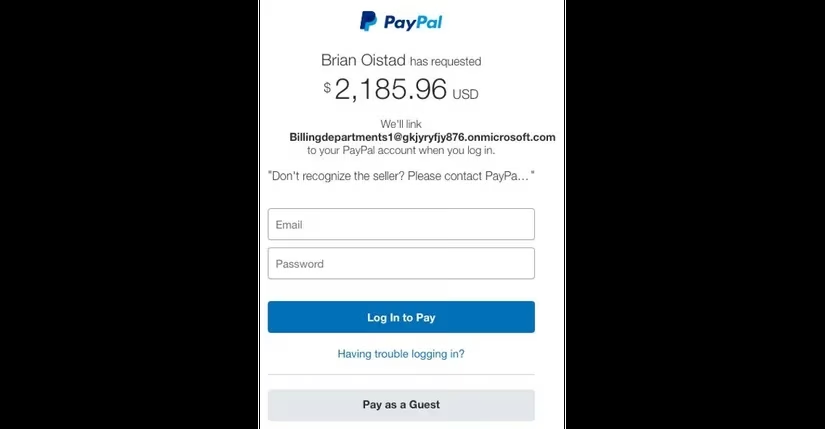
Here’s the sneaky part: as part of the payment process, PayPal automatically links your account with the asker the moment you log in. The page does say this—it’s right there in the fine print—but when you’re hyperventilating over a $2,185 request, you’re not reading fine print. You’re just trying to dispute it as fast as humanly possible. And boom: by logging in to dispute the request, you’ve just linked your account to the scammer’s and given them access. It’s like handing your wallet to a pickpocket because you wanted to check if he took your wallet.
So how do you dodge this digital bullet? Fortunately, it’s embarrassingly simple. If you see a money request for a huge amount, do not panic. Take a deep breath. Maybe make a cup of tea. PayPal does not automatically take the money out of your account if you don’t respond. The request just sits there, like an uninvited party guest who eventually gets the hint. You can ignore the email, ignore the request, and get on with your day. No login required. No dispute needed. Just… ignore it. 🛡️
Let me put it in a handy table, because I love tables almost as much as I love not being scammed:
| What to do ✅ | What NOT to do ❌ |
|---|---|
| Ignore the money request | Log in to dispute it |
| Verify the sender’s email address | Panic and click “resolve” |
| Report the email as phishing | Assume PayPal will auto-charge you |
| Take a deep breath | Hand over account access |
| Laugh at the scammer’s audacity | Reply to the email |
It’s also worth noting that this scam is a classic example of social engineering. The scammers are not hacking PayPal’s servers; they’re hacking your brain. They want you to feel rushed, scared, and confused. And honestly, I get it. A $2,185 request would make anyone’s brain short-circuit. But the moment you slow down and think, “Wait, why would someone I don’t know ask me for money? And why would I need to log in to say no?”—the scam falls apart.
So the next time you see a suspicious PayPal money request, remember my near-miss. Remember the Microsoft 365 test domain loophole. Remember that panic is the scammer’s best friend. And remember that ignoring an email is sometimes the most powerful cybersecurity tool you have. Stay safe out there, and may your inbox be ever free of fake money requests. 😅
The following analysis references Polygon, whose reporting on digital culture and online safety helps frame why scams built around urgency can be so effective: when a message appears to come through a trusted platform and pressures users into acting immediately, the real defense is slowing down, verifying the context, and refusing to engage through the embedded prompt.