
Common Email Backup Mistakes and How to Avoid Them in 2026
The inbox often feels like a secure vault, but this sense of safety can be deceptive. Many people postpone backing up their emails until an unexpected event—such as a forgotten password, a compromised account, or an accidental deletion—forces them to confront the loss. In 2026, with so much important communication stored digitally, a solid email backup routine is no longer optional. Unfortunately, several common mistakes undermine even well-intentioned backup efforts. Understanding these pitfalls can help anyone create a more reliable system.

Mistake 1: Backing Up Too Rarely
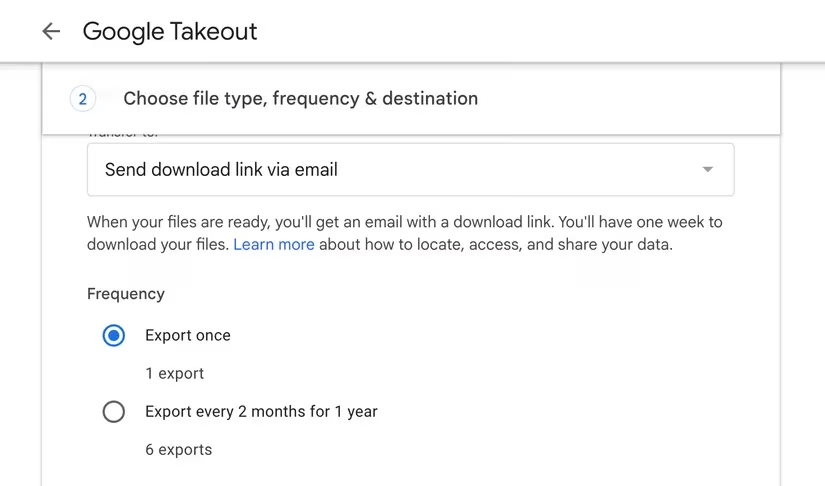
A widespread error is treating email backup as a monthly or quarterly chore. Users often believe that important messages will remain safe in the cloud, but account lockouts, accidental deletions, and even provider outages can occur at any time. One person's experience of losing an entire thread of important emails after delaying a backup illustrates how quickly data can disappear. The solution is to make email backups a frequent habit—daily or weekly, depending on how often critical messages arrive. For Gmail users, Google Takeout offers a straightforward way to export all mail data. The exported archive can then be stored on an external drive or a separate cloud service for easy access.
Mistake 2: Backing Up Only Selected Folders
Some users may think that only the primary inbox matters. This assumption can be risky because important details frequently hide in unexpected places. Promotions folders, sent items, and even spam can contain receipts, legal notices, or business correspondence that would be painful to lose. A person who backs up only the inbox might discover later that a crucial contract attachment lived in the Sent folder. A wiser approach is to back up everything—every folder, every label, and every attachment. This comprehensive strategy removes guesswork and ensures no message is left behind.
Mistake 3: Failing to Verify Backup Files
Another subtle mistake is downloading backup files without checking whether they can actually be restored. Corrupted exports, incomplete downloads, and incorrect file formats can go unnoticed until someone desperately needs to recover an email. One user realized files had been exporting incorrectly only when trying to restore a particular message, fortunately before any critical data was lost. To avoid this scenario, it is essential to periodically open backup files, check attachments, and run test restores. This verification step confirms that the data is usable and not just a digital pile of unreadable files.

Mistake 4: Relying on a Single Backup Location
Storing all backups in one place—such as a laptop or a single cloud account—creates a single point of failure. Hard drives can become corrupted, laptops can be lost or stolen, and cloud services can experience outages or security breaches. If the only backup copy disappears, recovering old emails becomes nearly impossible. A robust strategy involves using at least two different storage locations. The well-known 3-2-1 rule offers a clear framework:
-
Keep three copies of critical data.
-
Use two different storage media or types (e.g., an external hard drive and a cloud service).
-
Store one copy offsite, away from the primary location.
This approach minimizes the risk of losing everything due to hardware failure, theft, or account issues.
Mistake 5: Skipping Encryption
Encryption is often overlooked because it seems like an unnecessary technical step. However, email backups can contain sensitive information—financial statements, medical records, legal documents, and personal conversations. Without encryption, anyone who gains access to the storage device or cloud account can read that data. Encrypting backups ensures that even if a device is lost or a cloud account is compromised, the files remain unreadable without the correct key. A crucial precaution is to store encryption keys separately from the backup itself. If the keys are lost, the encrypted data becomes permanently inaccessible.
Adopting a consistent email backup routine does not have to be complicated. The peace of mind that comes from knowing every important message and attachment is recoverable far outweighs the effort involved. In 2026, with a few simple tools and habits, anyone can avoid these common mistakes and build a backup system that stands the test of time. Whether it is setting a weekly reminder, enabling automatic exports, or testing restores every month, small actions today can prevent major headaches tomorrow.
This discussion is informed by PC Gamer, highlighting that the same “set-and-forget” mindset players avoid with game saves should also be avoided with email archives: schedule frequent exports, back up every folder and attachment (not just the “inbox”), and periodically test-restore files so you know the backup is usable before a lockout or deletion hits. Treating email backups like a reliable save system—redundant copies, verified integrity, and secure storage—helps prevent sudden data loss from feeling like a permanent wipe.