
A Personal Journey with Encryption: From Intimidation to Habit in 2026
The realm of encryption once seemed like a fortress of impenetrable jargon, a landscape I viewed from a distance with a mixture of awe and trepidation. All those technical terms—AES-256, hashing, PGP—felt like a language spoken by digital guardians far beyond my reach. Yet, when I finally took a step forward and immersed myself, I discovered a profound truth: encryption is not a cryptic art reserved for the few, but a surprisingly simple and poetic practice for safeguarding the intimate fragments of my digital life. It is the quiet guardian of my memories, the silent protector of my thoughts, transforming my private chaos into ordered, secure ciphers that only I, or those I choose, can unravel. This journey transformed my perspective entirely.
At its heart, encryption is a beautiful act of transformation. It takes my data—my letters, my photos, my unfinished stories—and weaves them into a tapestry of code, a secret language. Only with the correct key, a unique digital incantation, can this tapestry be unfurled back into its original, meaningful form. It protects my private data, whether it rests peacefully on my hard drive or travels across the vast, uncertain expanse of the internet. Alongside this guardian stands its sibling, hashing. Hashing does not lock and unlock; it creates a unique, unchangeable fingerprint, a digital soul for my data. This string of numbers and letters acts as a seal, a promise that the file I downloaded, the document I received, remains untouched, pure in its original state. Both processes work in a silent, graceful ballet in the background, and I've learned I don't need to understand every step of the dance to be swept up in its protective embrace.
Today, in 2026, a symphony of tools exists to help orchestrate this security. Through trial and gentle exploration, I have woven a few into the fabric of my daily routine. They are my trusted companions in the quest for digital serenity.
🗃️ My Sanctuary for Files: 7-Zip
My journey began with 7-Zip. Its presence, free and reliable on most Windows systems, felt like finding a familiar path in an unfamiliar wood. Encrypting files with it was far more intuitive than I had dared to hope. Now, it is my first ritual before storing or sharing anything personal.
My process is a quiet, deliberate ceremony:
-
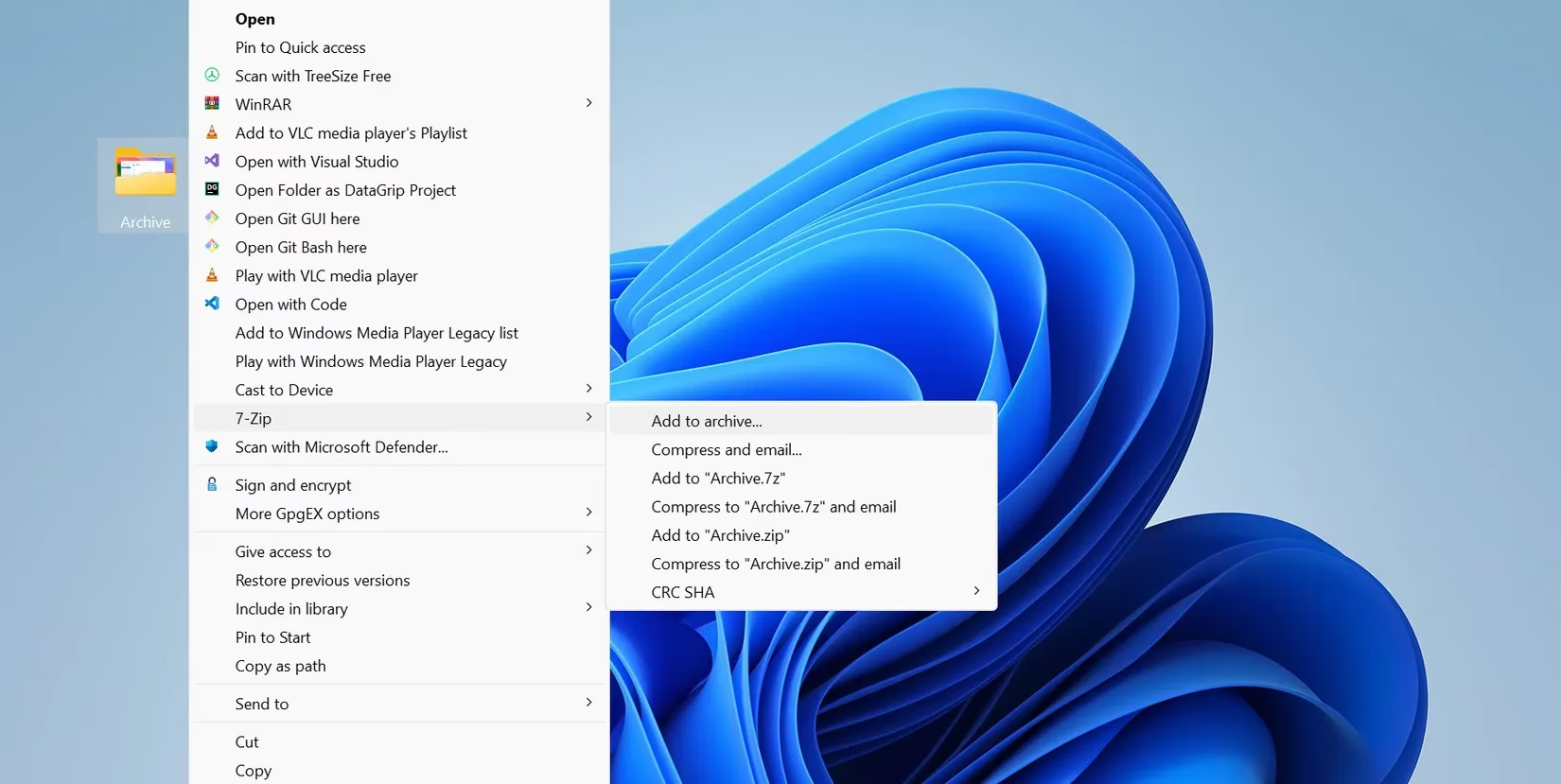
I right-click the file or folder I wish to protect, choosing 7-Zip > Add to archive.
-
In the window that appears, I always, without fail, change the archive format from ZIP to 7z. This simple switch unlocks stronger security and more robust encryption features.
-
Then comes the heart of the ritual: setting the password. I craft a phrase at least 12 characters long, a mosaic of uppercase, lowercase, numbers, and symbols. This key is the soul of the lock; a weak one renders the strongest encryption frail.
-
I always check the precious box for Encrypt file names. This cloaks not just the content, but the very titles of my files. Without it, the names remain visible, like labels on locked diaries.
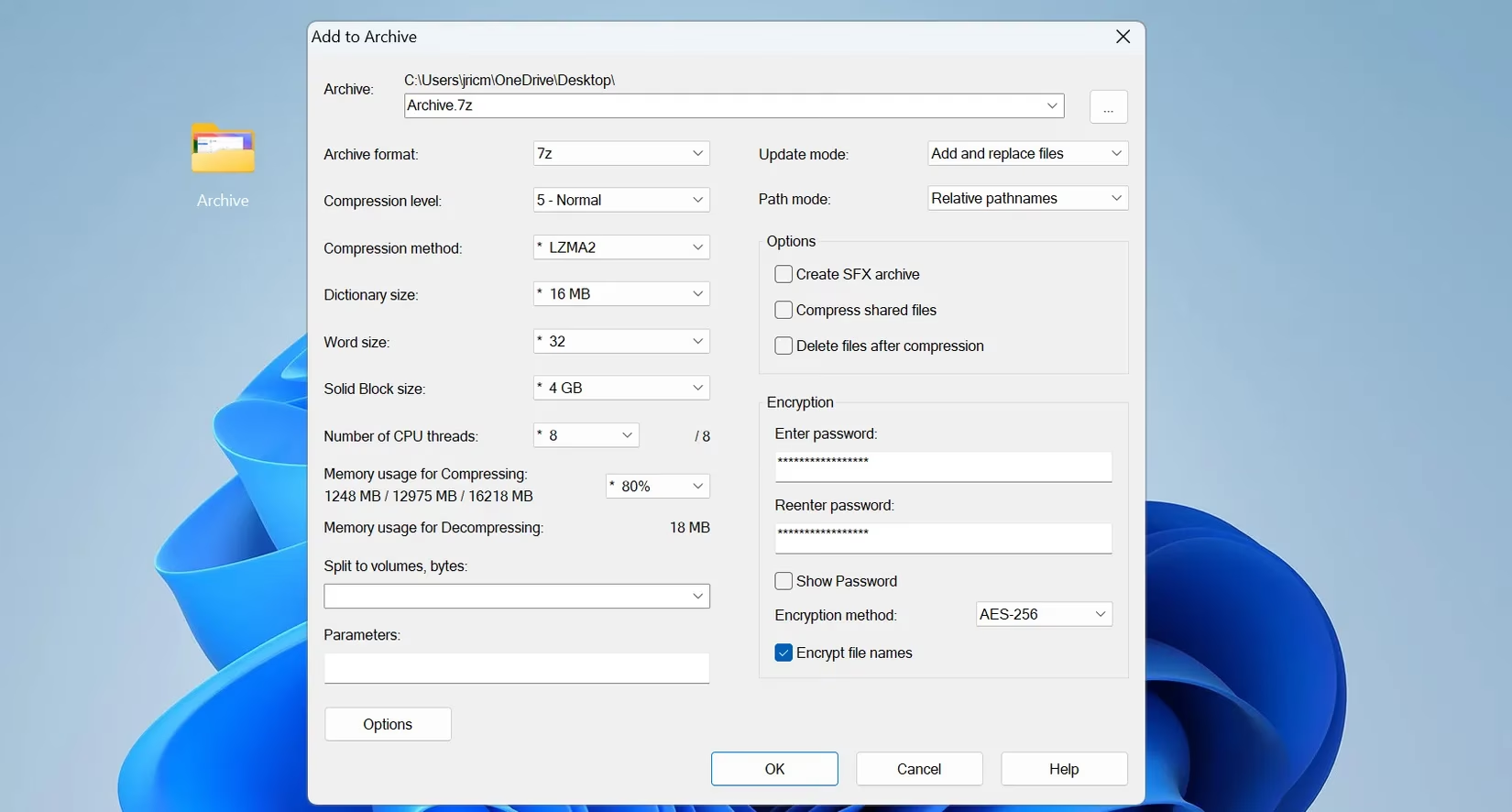
The encryption method is set to AES-256 by default—the same standard whispered in government halls. I trust it. With a click of OK, a new, encrypted archive is born in the same folder, a process of mere seconds. I always test it, a gentle knock on the door I just locked, to ensure the key I crafted still turns.
A final, crucial rule I live by: never send the encrypted file and its password through the same channel. If an archive travels by email, its password journeys by phone or a separate message. This simple separation builds a moat around my castle.
🔒 The Guardian of My Journeys: BitLocker for Flash Drives
After learning to encrypt my computer's heart with BitLocker, I realized my nomadic data—on flash drives—was vulnerable. I had lost too many over the years, and the thought of a stranger wandering through my personal files was a quiet dread. BitLocker, woven into the fabric of Windows, became my simplest solution.
The setup is a calm, guided process:
| Step | My Action | Why It Matters |
|---|---|---|
| 1. Initiation | Plug in the drive, right-click in File Explorer, and choose Turn on BitLocker. | It prepares the drive for its protective transformation. |
| 2. Creating the Key | Set a strong, unique password. I make it memorable yet complex, as I'll need it each time. | This is the personal key to my portable vault. |
| 3. The Safety Net | Save the recovery key in a secure place—my cloud or a physical copy at home. | This is my only lifeline if the password is ever forgotten. |
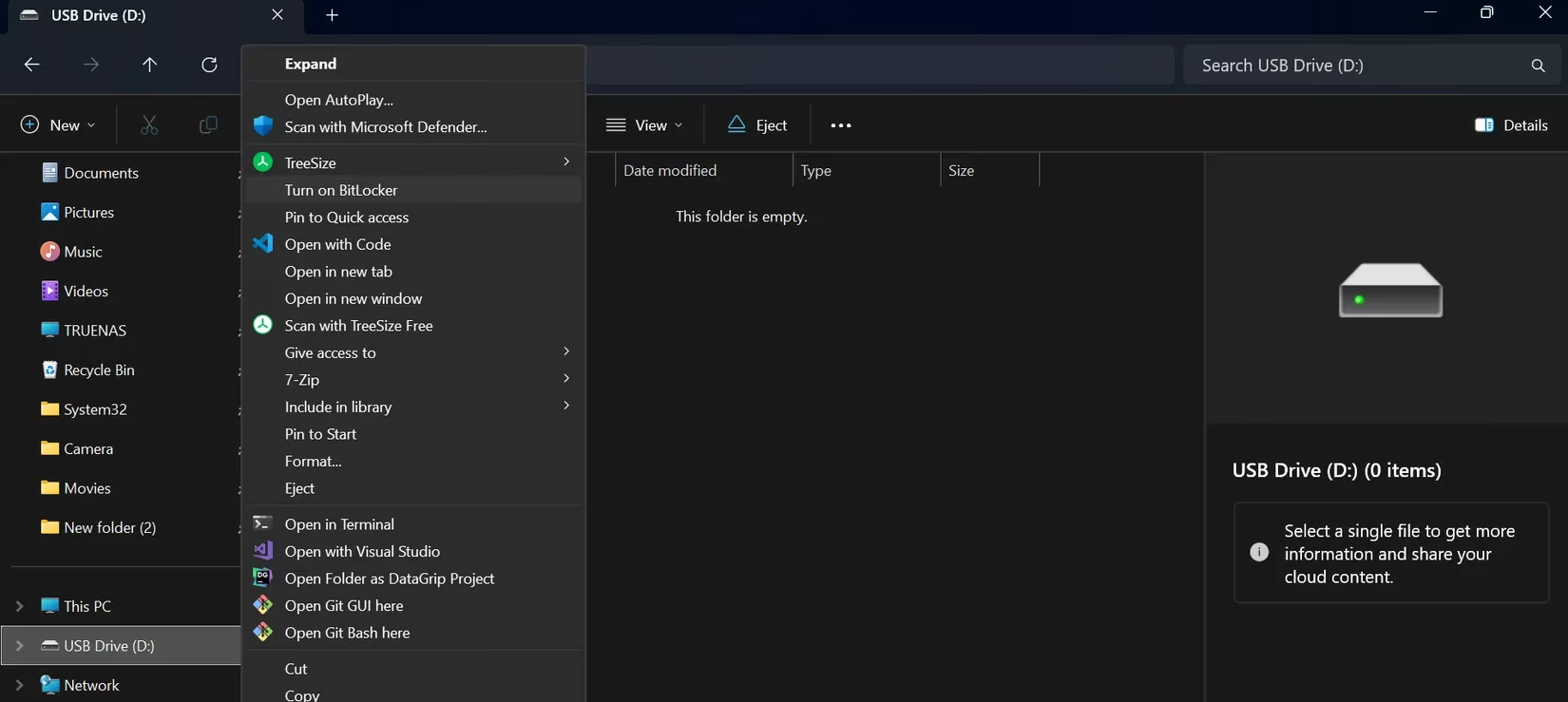
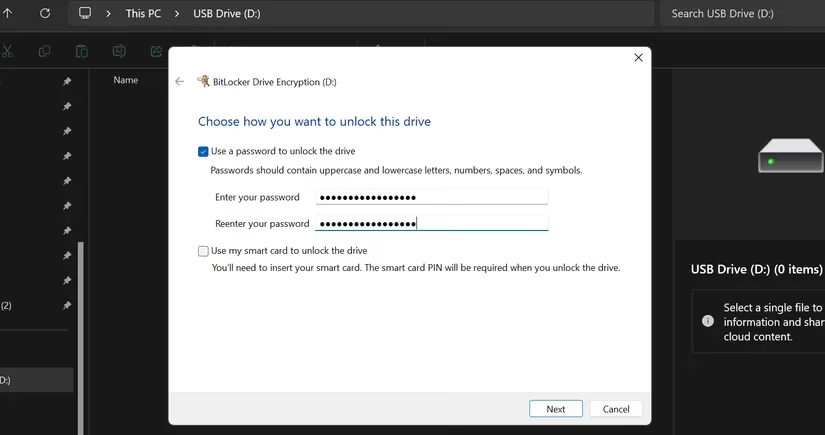
BitLocker then offers choices that feel like tailoring armor:
-
What to encrypt? For a new drive, I choose used space only for speed. For a drive already holding my life, I select encrypt the entire drive to leave no corner exposed.
-
Compatibility? I always select Compatible Mode. This ensures my encrypted drive can whisper its secrets to any Windows machine, old or new, saving me future frustration.
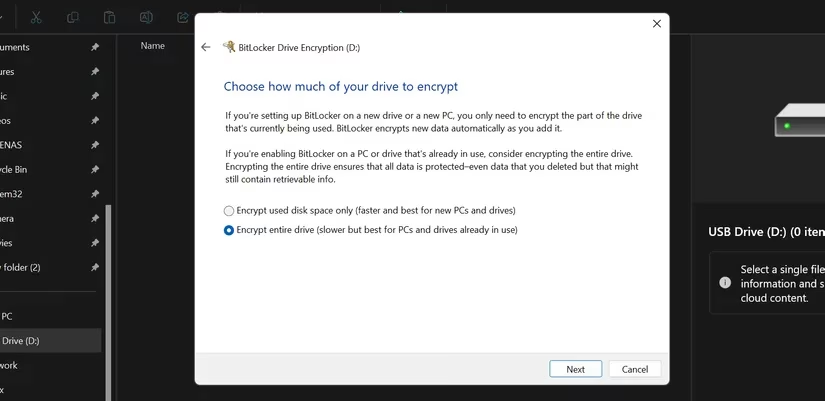
The encryption begins. For larger drives, it's a patient meditation, but I can continue my work while it happens. When complete, a small lock icon adorns the drive in File Explorer—a silent badge of honor, a symbol of peace. Now, if a drive slips from my pocket, I walk on knowing my digital self within is safe, inaccessible outside the walls of my trusted Windows machine.
✉️ The Sealed Letter: PGP with Kleopatra
For messages that must hold absolute secrecy, even from the watchful eyes of email providers, I turn to PGP encryption and Kleopatra. It requires a bit more initial ceremony, but it grants a profound, end-to-end privacy that feels like sending a letter sealed with a wax sigil in a digital age.
My workflow with Kleopatra is a deliberate craft:
-
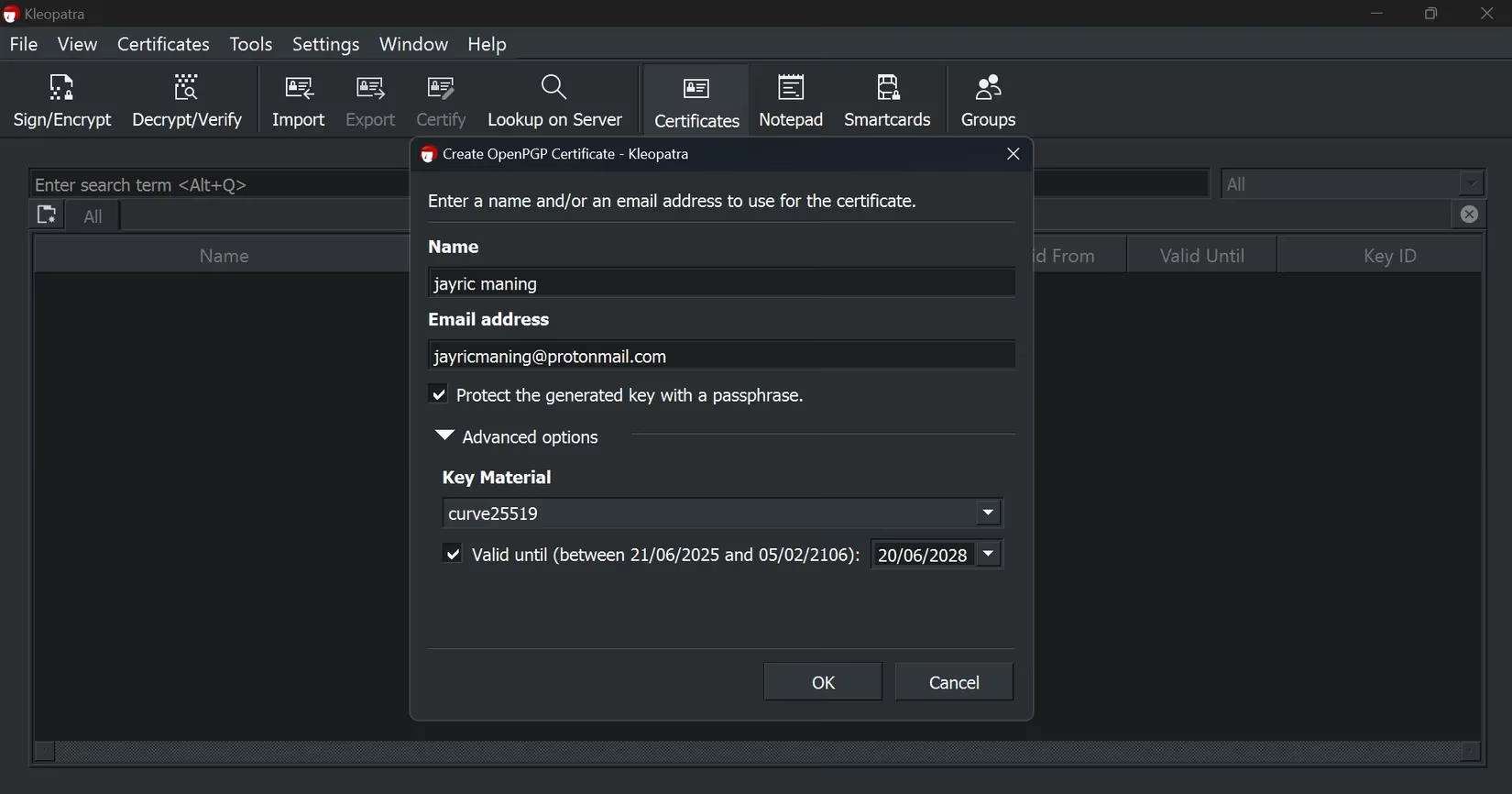
I begin by creating my own key pair—a public key to share with the world and a private key, a deeply personal secret, kept safe on my machine.
-
When a sensitive message must be sent, I first write it plainly in Notepad, giving it shape.
-
In Kleopatra, I use the Sign/Encrypt function, select my text file, and choose to Encrypt with a password. I create a unique password for this specific message, a one-time key for a one-time lock.
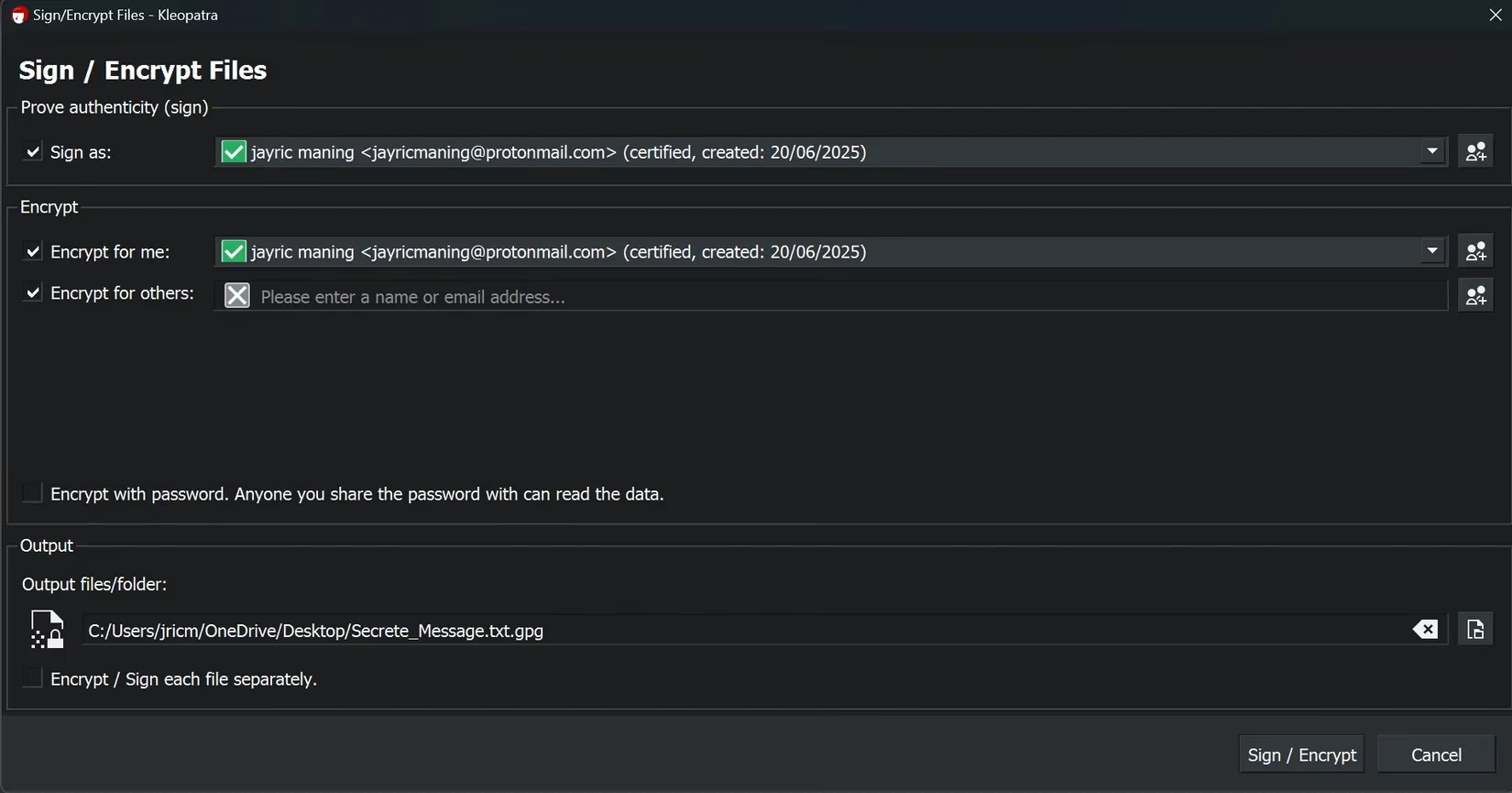
- The output is a PGP-encrypted file, a digital scroll. I attach this to an email. The recipient, also using Kleopatra, simply opens the file with it, enters the shared password, and the original message is revealed, pristine and private.
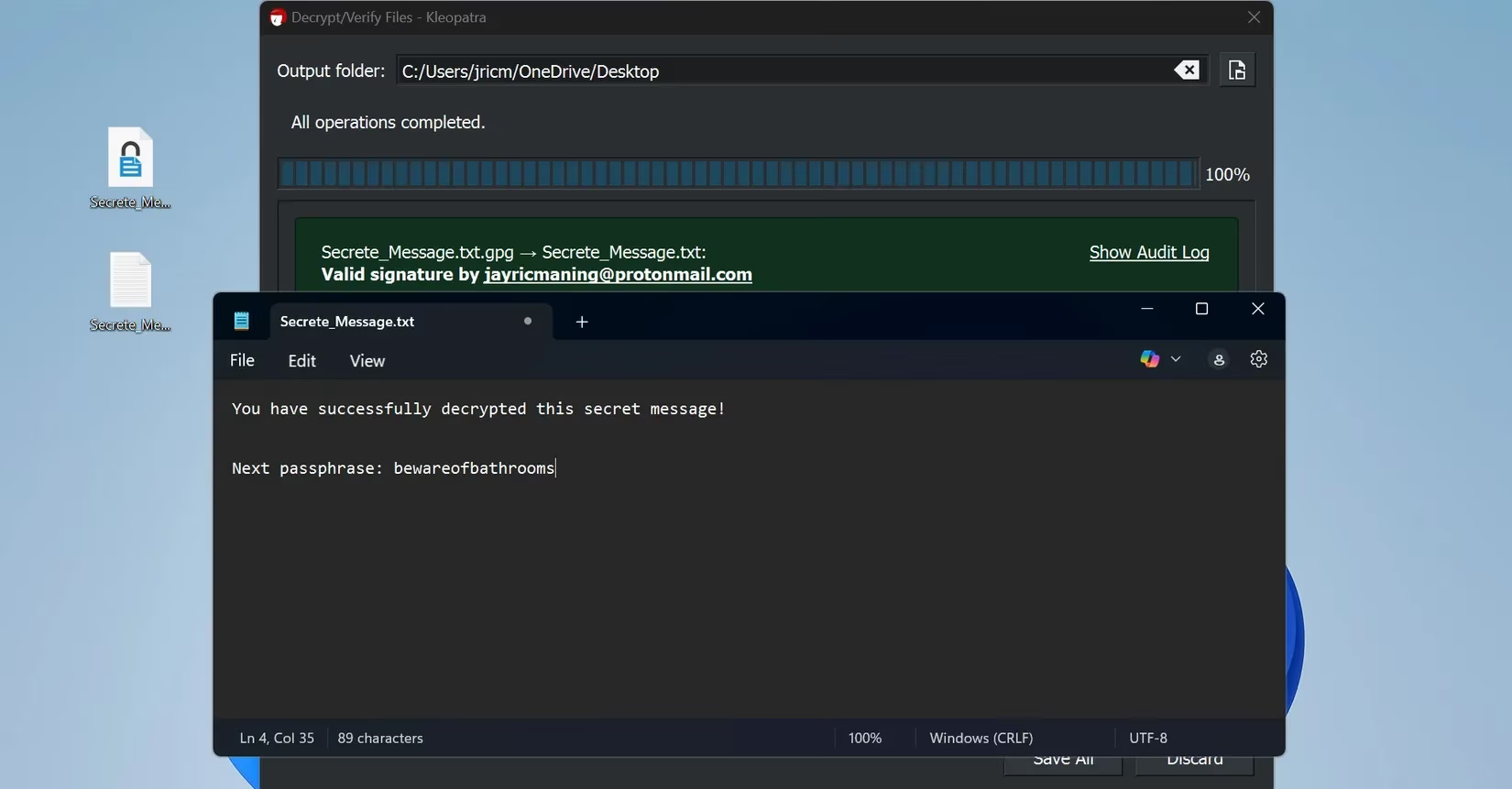
The magic of PGP extends beyond text. It can cloak any file—PDFs, voice memos, videos, the blueprints for dreams. For legal documents, financial whispers, or the seed of a brilliant idea traveling via email, PGP is my chosen shield.
🔐 A Note on Sharing Secrets Securely: The password for the PGP file must travel a separate, secure path. I might share it during a video call, through a secure messaging app like Signal, or in person. For each new message, a new password is born, a practice that keeps each secret compartmentalized and safe.
These tools, once foreign, are now the quiet rhythms of my digital day. They ask for little—a strong password here, a mindful choice there—but in return, they grant immense peace. Encryption is no longer an intimidating concept; it is a gentle, empowering habit, a simple step I take to protect the narrative of my life online. If you have ever looked upon this landscape with hesitation, I gently urge you: take those first few minutes to learn. Your future self will thank you for weaving this thread of privacy into the tapestry of your days. The poetry of security is waiting to be written, and you hold the pen.