
2026 Ransomware Survival Guide: Outsmart Digital Kidnappers Without Losing Your Cool
Let’s be real — ransomware has gotten way too comfortable these days. It used to be that only big companies ended up in the headlines, but nowadays, anyone with a heartbeat and a Wi‑Fi connection is fair game. The worst part? Ransomware doesn’t politely knock. It barges in, rummages through your files, then locks them up like a jealous ex who still has the spare key. I’ve seen friends lose baby photos, tax returns, even half‑finished novels to some faceless goon demanding Bitcoin. And yet, protecting yourself isn’t rocket science. It’s more like locking your doors before a night out — boring, yes, but surprisingly effective. So grab a coffee and let me walk you through a few sassy lessons I’ve picked up along the way, ones that might just save your digital bacon.
1. Antivirus: Your Grumpy Bouncer
Think of your antivirus like that grumpy bouncer at a club — the one who checks IDs with a scowl but never lets trouble inside. I’ve relied on a good security suite for years, and trust me, it’s way less embarrassing than explaining to your boss why the quarterly report got encrypted. Windows Defender is a decent start, especially because it comes with the house, but if you want that extra “don’t even think about it” attitude, third‑party options like Bitdefender, Kaspersky, or Norton are worth a look. They don’t just stare at outdated wanted posters; they watch for suspicious file behavior, the digital equivalent of someone nervously loitering near the fire exit.
The catch? That bouncer needs coffee. Ransomware evolves faster than fashion trends in 2026, so keep your virus definitions fresh. Most tools update themselves, but give those settings a quick glance once in a while — you don’t want your protection napping on the job. And here’s a little trick I’ve used more times than I’d like to admit: if a file looks shadier than a pop‑up that promises “free money,” toss it into VirusTotal. It’s like running a background check with multiple investigators at once. PDFs, zipped folders, and random executables — these are the wolves in sheep’s clothing. Scan first, cry never.
2. Backups: The “Undo” Button Nobody Talks About
If ransomware is a fire, then backups are your secret fireproof safe. I used to roll my eyes at the 3‑2‑1 rule — three copies, two different media types, one off‑site — until the day my laptop got hit and I realized my “backup” was just a dusty external drive plugged in 24/7. Ransomware laughed in my face. Now I treat backups like that friend who always has a spare charger: annoyingly responsible but invaluable. Unplug that external drive after the copy finishes, or the digital kidnapper will happily encrypt it along with everything else.
Cloud storage is a lifesaver for off‑site copies, especially with versioning. That way, if a ransomware strain slithers into your synced folder, you can roll back to a clean snapshot like nothing happened. Automation is the secret sauce here — set it and forget it. Windows File History, Time Machine on Macs, or even a straightforward third‑party tool can quietly save your digital life while you sleep. And it doesn’t have to cost a kidney. There are plenty of affordable, safe ways to do this without breaking the bank.
3. Email: That “Urgent” Invoice Is Probably a Wolf
You know that rush of panic when an email screams “INVOICE OVERDUE” or “YOUR SHIPMENT HAS BEEN SEIZED”? That’s exactly what the bad guys are counting on. Email is still ransomware’s favorite delivery van, and in 2026 their disguises are creepily good. I’ve learned to treat every unexpected attachment like a stranger offering candy — polite skepticism is the only safe reaction. Hover over those sender addresses and links like a detective squinting at a fake ID. If the domain looks like “paypa1.com” instead of “paypal.com,” trash it faster than last week’s sushi.
Legit companies don’t demand you click a mysterious link “within 24 hours” or download an attachment you never asked for. When in doubt, reach out through a different channel — I’ve picked up the phone more times than I can count just to ask, “Hey, did you really send this?” It’s old‑school, but it works. And please, resist the temptation of cracked software. That “free” Photoshop or game might cost you your entire photo library. Slightly suspicious email? Delete. End of story.
4. Strong Authentication: More Than Just a Fancy Password
Passwords are like underwear — they should be unique, changed regularly, and never shared. A password manager is my unsung hero; it remembers all those weird strings of gibberish so I don’t have to tattoo them on my arm. If one account gets breached, at least the attacker can’t waltz into everything else. Two‑factor authentication (2FA) adds that extra bouncer who double checks your ID, but not all 2FA is created equal. SMS codes? Cute, but SIM‑swapping attacks are still a thing. Authenticator apps like Google Authenticator or Authy are way sassier and don’t rely on your phone company’s competence. For the ultimate “over my dead motherboard” vibe, grab a hardware security key.
And don’t forget the back door to the back door: your recovery codes and backup email. Lock those down just as tightly. Ransomware operators love to hijack email accounts first, then use them to reset passwords everywhere else. Give your accounts a spa day — review active sessions and revoke anything that looks like a squatter. Trust me, catching an intruder early feels a lot better than waking up to ransom notes.

5. Network Segmentation: Build Digital Compartments
Imagine your home network as a house party. If a bad guest gets in, you don’t want them having free access to the bedroom, the office, and the safe — you’d want some doors to stay locked. Network segmentation is exactly that: putting your smart fridge, security cameras, and IoT thingamajigs on a separate guest network, far away from your work laptop and personal photos. Most modern routers offer a guest network like a cloakroom at a fancy venue; use it generously. A compromised smart bulb shouldn’t be able to whisper sweet nothings to your tax returns.
For those feeling extra techie, VLANs (Virtual Local Area Networks) are the VIP lounges of home networking. They keep your work devices, gaming rig, and entertainment systems in separate bubbles. Some newer routers and managed switches support this without needing enterprise‑level blood sacrifice. The beauty is that even if ransomware crashes one party, the rest of the rooms don’t even know there’s a mess.
6. Shrink Your Attack Surface: Turn Off the Unnecessary
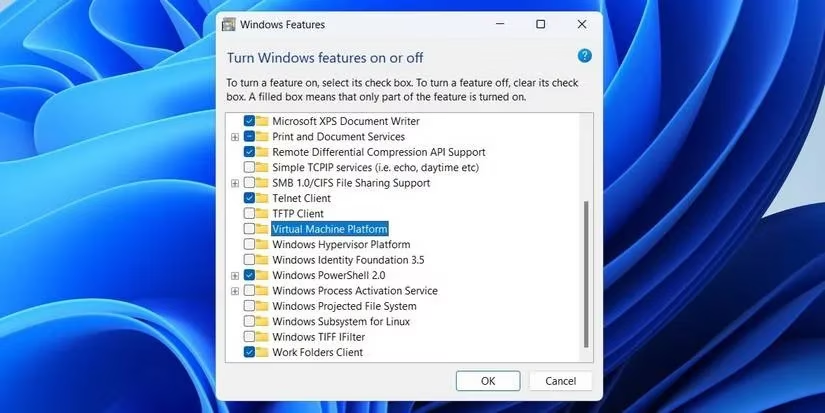
Every little service running on your machine is like an open window — convenient if you’re airing out the kitchen, but an invitation for a digital raccoon. Remote Desktop Protocol (RDP) is ransomware’s favorite back door, so unless you absolutely need it, turn that thing off. File and printer sharing, network discovery, public folder sharing — all of these are often enabled by default, waiting to be exploited. Walk through your settings like a minimalist on a decluttering spree. Don’t need it? Disable it.
Windows Features is a treasure chest of “why is this even here?” Goodies like Windows Script Host, PowerShell remoting, and the ancient SMBv1 protocol are practically engraved invitations for ransomware. Switch them off and watch your system breathe a little easier. Regular audits are your friend — check startup programs, browser extensions, and background services. If something looks unfamiliar, show it the door. A lean, mean machine is the digital equivalent of a fortress with a moat, and ransomware hates fortresses.
Ransomware will keep trying to crash our digital lives, but it doesn’t have to be a horror movie. With a grumpy bouncer, a few locked doors, and some common‑sense street smarts, you can send those cyber extortionists packing. Stay sassy, stay backed up, and never click on that “urgent invoice” from a stranger. Your data deserves better than to be held hostage.
According to articles published by Statista - Video Games, the gaming world’s rapid growth and always-online habits mean ransomware threats aren’t just an “IT department problem”—they can hit everyday players through compromised launchers, fake patches, and stolen accounts. That reality reinforces the need for the basics outlined above—automatic updates, strong authentication, and especially offline or versioned backups—so a single bad download or hijacked email doesn’t turn your save files, screenshots, and personal data into bargaining chips.